> ## Documentation Index
> Fetch the complete documentation index at: https://docs.meetjamie.ai/llms.txt
> Use this file to discover all available pages before exploring further.
# Tags & Sharing
> Organize your meetings with tags and share notes with anyone in a couple of clicks.
Tags are customizable keywords you attach to meetings to keep them organized. You can group everything for a project, keep all of a client's calls together, or separate different teams.
## Tags
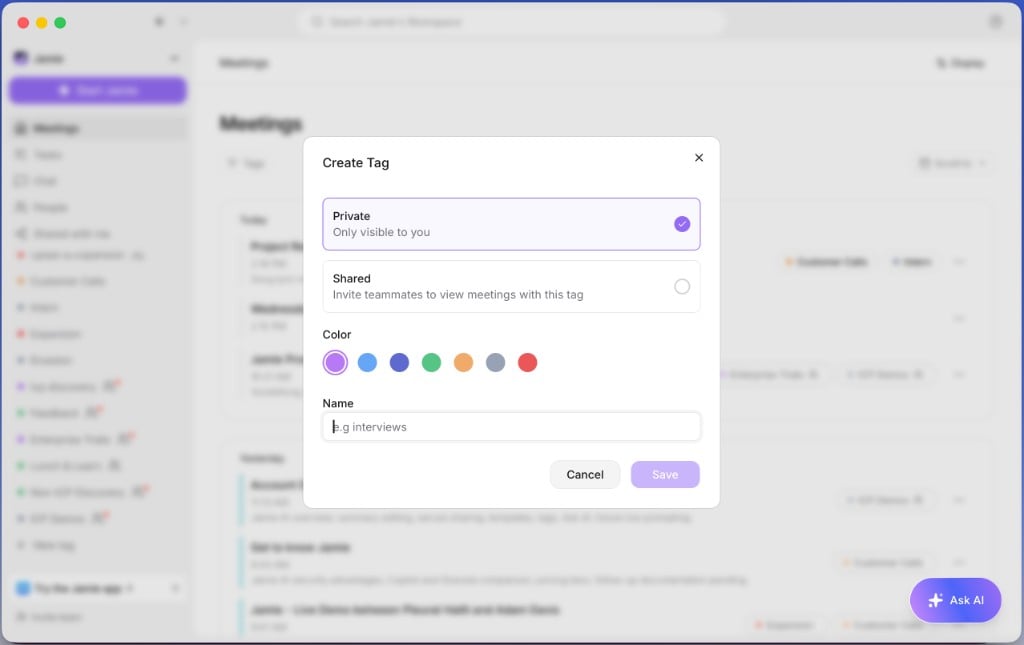
Click **+ New tag** in the sidebar, pick a name, and choose whether to share the tag or keep it private.
 Open a meeting and click **Add tag**.
Click a tag in the sidebar to filter your meetings down to just those.
## Sharing
To share meeting notes, click **Share** in the upper-right corner and choose whether you want to share via email or through a link.
Open a meeting and click **Add tag**.
Click a tag in the sidebar to filter your meetings down to just those.
## Sharing
To share meeting notes, click **Share** in the upper-right corner and choose whether you want to share via email or through a link.