

AI & Agents
Bring your meeting context into your AI assistant.ChatGPT
Install the Jamie plugin to ask ChatGPT about your meetings
Claude
Connect Jamie from the Claude directory to ask Claude about your meetings
Copilot
Connect Jamie to an agent in Microsoft Copilot Studio
Other AI tools
Connect other AI tools using Jamie’s MCP server
CRM Integrations
Automatically log meeting notes to your CRM. Keep your sales records up to date without manual data entry.HubSpot
Log meetings to contacts, companies, and deals in HubSpot
Salesforce
Attach meeting notes to opportunities, accounts, and contacts
Dynamics 365
Save meeting notes to leads, contacts, opportunities, and accounts
Attio
Sync meeting notes with your Attio workspace
Note-Taking Integrations
Export your meeting notes to your preferred documentation tool. Keep everything organized in one place.Notion
Create Notion pages with your meeting summaries and transcripts
Google Docs
Export meetings to Google Docs for editing and collaboration
OneNote
Save meeting notes directly to your OneNote notebooks
Task Management
Turn action items from your meetings into tasks in your project management tool.Asana
Create Asana tasks from meeting action items and keep projects moving
How Integrations Work
The steps below apply to CRM, note-taking, and task integrations. For AI tools, choose a setup guide above.Connecting an Integration
- Go to Settings → Integrations
- Select the integration you want to connect
- Click Connect and follow the authorization flow
- Configure your preferences
Sharing to Integrations
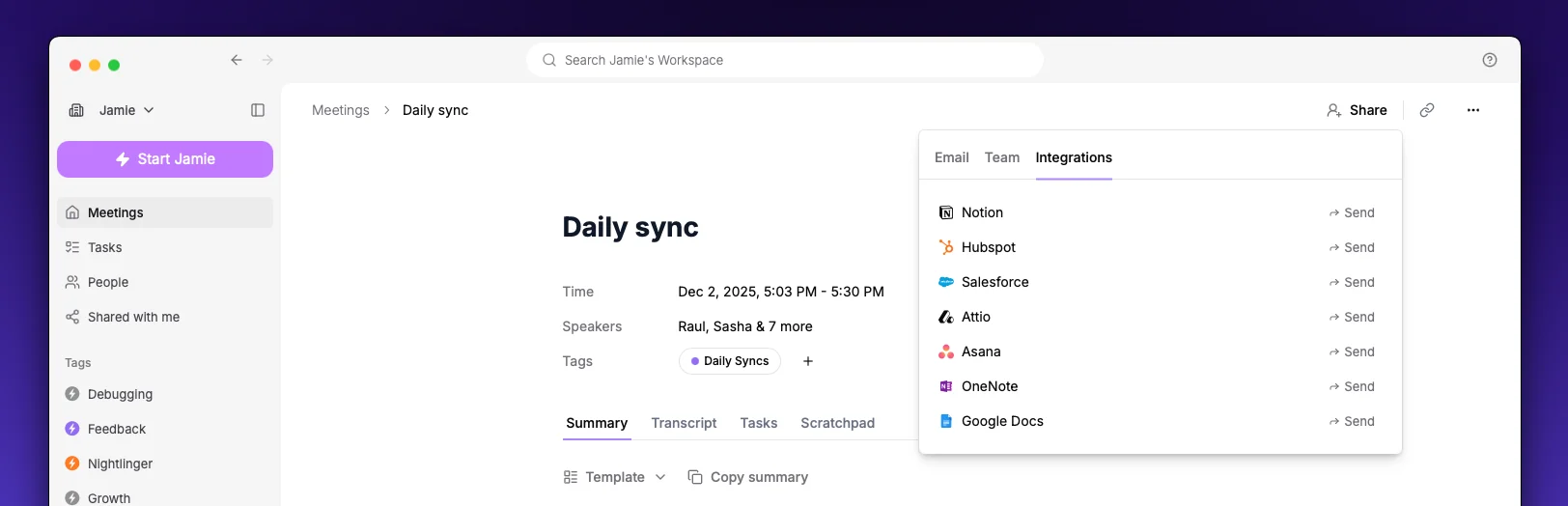
- Manual sharing — Click Share on any meeting, go to the Integrations tab, and select where to send it
- Automatic sync — Enable auto-sync in integration settings to automatically send all new meetings
Managing Integrations
You can manage your integrations at any time in Settings → Integrations:- View connection status — See which integrations are connected
- Configure settings — Choose what content to sync (summary, transcript, tasks)
- Disconnect — Remove an integration when you no longer need it
What Gets Synced
Each integration lets you choose what content to include:Not all integrations support all content types. Check individual integration pages for details.